Interactive Desktop Workflow

BirdyBank Library + AI LabInteractive Demo

Switch directly between Library and AI Lab below to try masonry, list view, search, tags, ratings, multi-bird boxes, camera focus, and automatic species writeback.

Interactive web demo · uses fixed sample data and never uploads photos or connects to a recognition service
BirdyBankLibrary + AI Lab · Interactive Demo
Web simulation
One library for photos · video · audio

Q / E or ← / → switch birds · 0 / Esc fit image

One media archivePhotos, video, and field audio
Files stay in placeInternal, synced, and external drives
On-device batch AIReference run: 25 photos in 11.6s
Ready after installModels and media runtime included

Photos · video · field audio, one archive

Every sight and sound,one search away.

Keep photos, including RAW files, video, and bird recordings on your computer, an external drive, or a locally synced OneDrive, iCloud Drive, or Google Drive folder. BirdyBank builds a local index so species, tags, ratings, and field notes stay searchable.

Choose My Version
Local · synced folders · external drivesDetection and ID run on deviceStart without an account

One workstation, the whole archive

A real organization workflow—not one AI screenshot.

From intake and review to burst grouping, identification, and long-term insight, every step reflects tools already present in the desktop app.

01

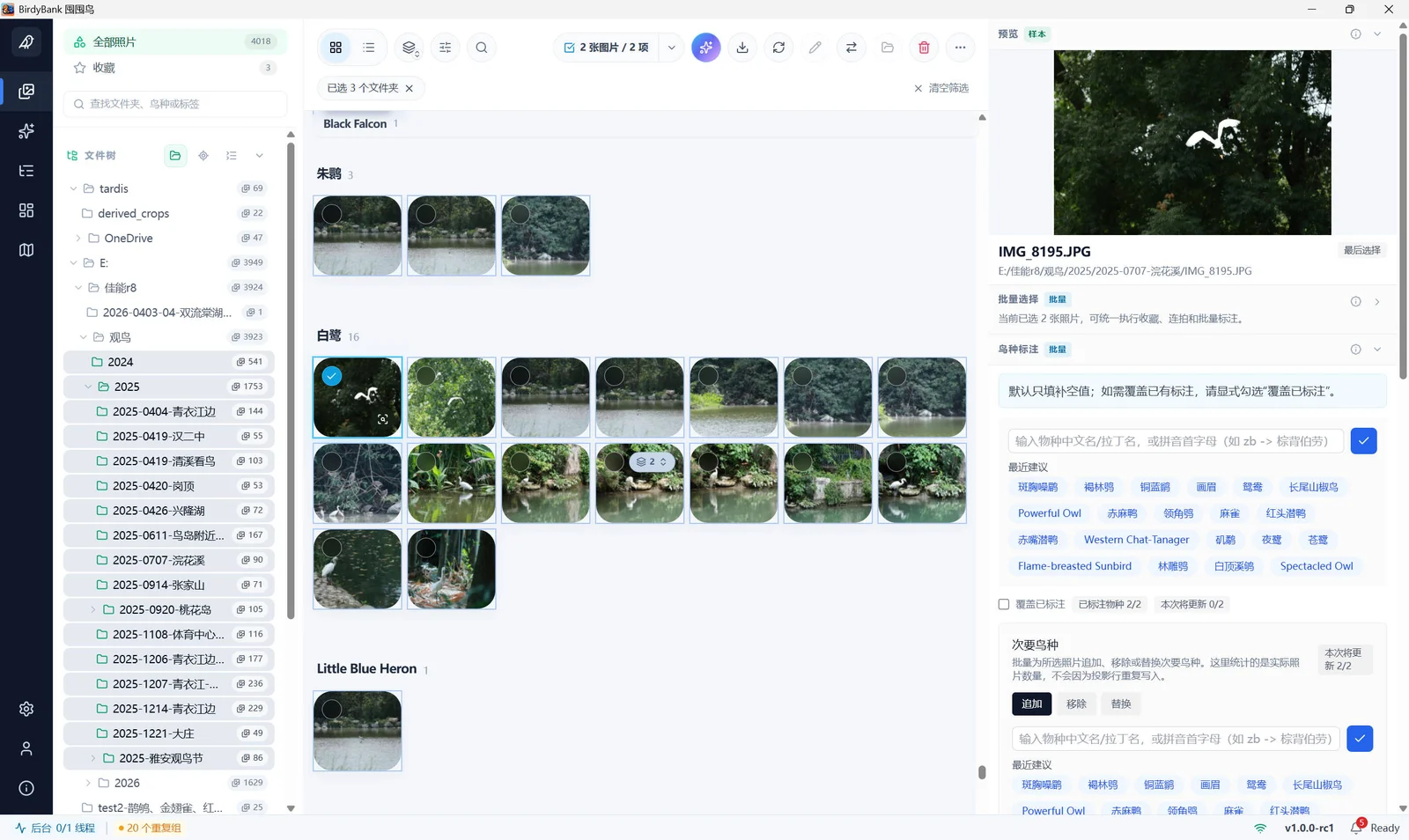
Scan in masonry. Organize precisely in a list.

Folder tree, virtualized masonry, configurable list, and inspector stay in one workspace. Narrow results by filename, path, tags, notes, or taxonomy fields.

Virtualized library and progressive previews Live masonry / list switching Filename, path, tag, and taxonomy search
SCREEN / 01
Library masonry view

Flexible export planner

Export into a structure that fits the work—not one flat folder.

The desktop wizard can build folders by time, taxonomy, time then taxonomy, or taxonomy then time. Date, species, and sequence tokens can also shape filenames. These controls generate a live directory preview.

Files stay where they belong

A drive can go offline.Its records stay with you.

BirdyBank indexes folders your computer can access instead of moving originals into another cloud library. If an external drive is unplugged or a synced file goes offline, its index, tags, ratings, species, and statistics remain. Mount the original path again to continue file operations.

BIRD_ARCHIVE is offline

Original-file actions pause; records and filters remain

Offline · records retained

Cloud support means folders synced to your computer; BirdyBank does not ask to sign in to your cloud account.

Local library indexPaths · tags · ratings · species · bursts
Local foldersCONNECTED
OneDrive synced folderCONNECTED
iCloud DriveCONNECTED
Google DriveCONNECTED
External driveINDEX SAFE

Labels travel with the folder

Share the folder.Let your annotations travel with it.

With “labels travel with the folder” enabled, BirdyBank keeps a .birdybank.json file inside fully managed bird-photo folders. Copy or move the complete folder and another computer using BirdyBank can restore species, secondary species, tags, ratings, and notes.

This file travels with the folder as a local record of your library. Existing edits always win, so an older record never quietly overwrites them. Importing a few individual bird photos does not create or change it.
Your BirdyBankSpecies, tags, and ratings completed
BIRD_ARCHIVE / 2026.birdybank.json
# Species★ Rating⌁ Tags✎ Notes
Another BirdyBankImports the same complete folderAnnotations restored

Local-first by design

The models ship with the app—no upload or cloud round-trip.

Detection, identification, library organization, thumbnails, and duplicate groups all run on the desktop. Once warm, detection and identification commonly complete in hundreds of milliseconds; actual speed varies by device and file format.

Updates preserve existing labels

The desktop app uses versioned database migrations to carry local libraries forward, prioritizing existing photo paths, labels, and edits.

* Current reference run: 25 photos in 11.6s; detection p50 386ms and identification p50 118ms. Development hardware only; not a promise for every device.

01
Index in place

Files remain on their current drive or synced folder.

02
Search quickly

The local library keeps paths, tags, and searchable details.

03
Run local AI

Detection boxes and species ID do not upload photos.

04
Write back directly

Results return to the library for filtering or correction.

LATEST FIELD NOTE2026-07-29
v1.1.2

Smoother UI Experience and Detail Fixes

A smoother UI experience and fixes for several minor issues.

View Full Changelog

Ready for the next field trip

Bring home the bird photos.Leave the sorting to BirdyBank.

A permanent free version is available, and you can start without creating an account.

Open the Download Guide